Posts

More on Python class, attributes and naming.

I visited the learncodethehardway forum, and someone had an excellent question. There was a bit of an exercise where there was some confusion because of naming and where/what attributes were being set, what code was actually doing the work within the script. I made these two tiny examples to show the user what was going on in the python class. I wanted to put it in the blog for anyone else that may have some confusion with what is going on, because I know when I started, I sure did struggle with it. I'll put comments in the code to explain: ~~~~~~~~~~~ Example 1 ~~~~~~~~~~ --start code block-- class Spam(object): def __init__(self): # this is an attribute. It can be anything-- Even a class self.something = Hello() def spam(self): #self.something is an instance of Hello class self.something.hiYa() class Hello(object): #This is a python object that holds a method def hiYa(self): print("...
making a chatbox with localStorage Javascript

Image
So I got so excited to make this all work on my website, that I deleted my old repo I was using last weekend (on which I did all the JavaScript work) and downloaded my latest website version..... I will make another post to explain all this in a much simpler way,  but I just want to make sure the code is out there on the interwebs so I don't loose 10 hours of work again.  The biggest problem I was having, was not understanding that I couldn't properly save an array to localStorage.  I fiddled with JSON a ton today, but I couldn't get it to work.  I also knew I did not use it the last time to make my chatbox work, so the answer was somewhere else, and much simpler. simple answer: I was trying to split up this giant string, get it into arrays, get it into separate localStorage items... When all along I just needed to add "<br>" and change the innerHTML to my giant string I kept adding to in my localStorage.       ...

javascript: first steps of chatbox

Image
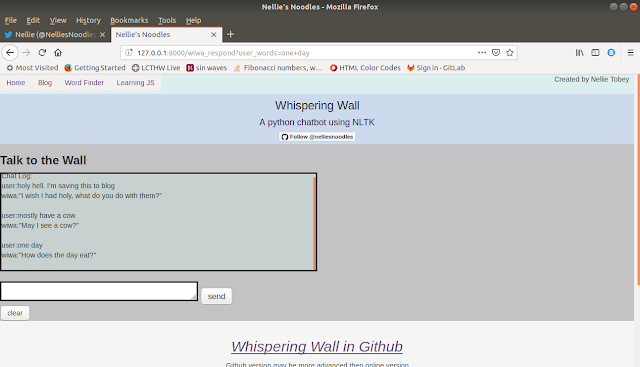
Keeping with tradition of these javascript experiments, this is set up just like all the others:   My html, and js file are in my desktop folder, and I double click my html file to see it run in the default browser.  I want to make my whispering wall's text display in a chatbox, so the user can see what they typed, and prior conversations. As of now, the whispering wall will take input, process it through the NLTK and python code, and return a response to screen. But none of the input is kept (or previous Wiwa responses) once the html is refreshed with the retrieved response from my scripts. So the first thing to do is see how to create this scrolling text box. This post only covers the experiment of creating/exploring how to display a chatbox. ( I am hoping to create the second part to this experiment today which will cover placing a script line from a file, into the chat box.) Just a few items I had to look up for the HTML javascript code: "clearing in...

Javascript array and changing an image with button

Javascript: iteration to change images in DOM Purpose: For the next experiment, it was trying to change an image by button click, and surf through the array in my javascript file. Setup: Remember all files are in the same folder. To replicate this experiment locally on your browser, have your image files, your HTML and your JS in the same folder, replace the file names in the image_array [] with your file names.  In my code, you'll see the image paths for my images. Double click that index.html file and see the code run.  *Note about frameworks and non-local use of this code* In an actual web app, with something like Django, the images would be in static / images,  the html, in templates, and the javascript in the static/js. But why? It's helpful to me to create these little projects so I can explore how things work. I'm sharing as I learn so that maybe this method would be useful to others.  Notes Next experiment I will evolve the style more, and try to retriev...

Simple setInterval Javascript HTML interaction test

Image
Using the method from the previous post: https://camelcasenoodles.blogspot.com/2019/04/a-simple-way-to-test-some-javascript.html I have made these two files to try out the 'setInterval' in JavaScript. picture of simple counter in a grey HTML page: I left the 'alerts' in the functions.  If I'm not sure if a function is being called, I can un-comment the alert, and see if I had an error that is preventing the function from being called. (I had G etElementById  instead of g etElementById   &&  HTML will ignore anything it can't read  *I'll look this up one day soon to confirm* )  No alert, the function is not being called. Break it, modify it, experiment.  May the spam be ever in your flavor. ***********  HTML  ********************** <!DOCTYPE html> <html> <head> <title>Exercise 1</title> <!-- your src will be different from mine.  see previous blog post linked at to...

A simple way to test some javascript

Image
Not too long ago I set up an entire Django app just for testing out my JavaScript interactions. Just this morning I realized I didn't have to do any of that. Simply create a folder, ( I did it on my desktop directory) and put your html, and referenced javascript in the same folder. To run the html file, all you have to do is double click it, The computer will run the HTML file through your default internet browser. As long as your path to the javascript file is correct in your HTML <script> tag that is located in the header, your javascript should run.  You can also change code and refresh the page on demand.   Why I didn't know this sooner is kinda irritating.  So if your looking for a simple way to do this, and stumble across my blog post, maybe this is for you. Example code below.  --May the spam be ever in your flavor -- <!--           The HTML    -->  <!DOCTYPE...

Python enchant and building a spell checker

Image
I decided to do this experiment because I realized Whispering wall would default to the end clause if everything a user enters is spelled wrong. Pictured below:  Watson assistant failed when I told him "I want to work on improving watson"  I probably had a mispelling, I can not fathom why it didn't pick something out of the sentence to use. h htt https://twitter.com/NelliesNoodles/status/1109236474640257024 ps://twitter.com/NelliesNoodles/status/1109236474640257024 ttps://twitter.com/NelliesNoodles/status/1109236474640257024 My enchant dictionary checked the validity of a word, but if that word was misspelled it was not valid, and placed in the errors.  The enchant dictionary also has an issue with whitespace, as I found out doing this, and that needed to be corrected for Wiwa also. Hoping to update her tomorrow. I still have to build the method that returns a 'fixed it for you' sentence, But I am debating if I want wiwa to just run with whatever w...